
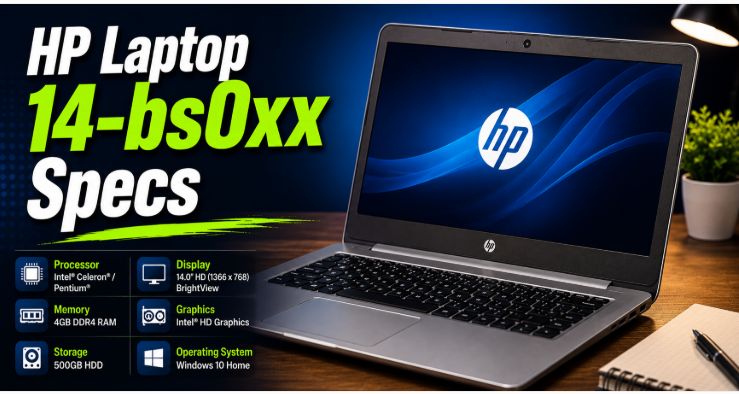
If you are searching for HP Laptop 14-bs0xx specs, there is one important detail to understand first: 14-bs0xx refers to a family of HP 14-inch laptops, not one exact configuration. Different sub-models can have different processors, RAM, storage, graphics, and displays. HP itself recommends checking the exact product number or serial number for complete specifications.
HP Laptop 14-bs0xx Specs at a Glance
The HP Laptop 14-bs0xx specs series was designed mainly as an affordable laptop for students, home users, and basic office work. Depending on the specific configuration, you may find Intel Celeron, Pentium, or Core-series processors.
Here is a general overview:
Feature Typical Specifications Display: 14.0-inch HD; some models with FHD HD Resolution 1366 × 768; FHD Resolution 1920 × 1080 on selected models Processor Intel Celeron, Pentium, or Core i3/Core-series options RAM: Commonly 4GB or 8GB storage HDD, M.2 SATA SSD, or selected dual-storage configurations Graphics Intel integrated graphics or AMD Radeon on selected configurations The HP Laptop 14-bs0xx specs camera is on many models. Wi-Fi 802.11ac options Bluetooth 4.2 on listed configurations Battery: 3-cell or 4-cell options depending on configuration Operating System Windows 10 configurations
The HP Laptop 14-bs0xx specs exact hardware varies significantly between sub-models, so these specifications should be treated as a range rather than the specification of every 14-bs0xx laptop. HP’s service documentation lists multiple processors, memory configurations, storage options, and display choices.
Also Read Laptop Power Button Not Working
Display and Design
The HP Laptop 14-bs0xx specs use a 14-inch display, making it reasonably portable for everyday use. Many configurations feature an HD resolution of 1366 × 768, while selected versions were available with a Full HD 1920 × 1080 panel.
The HP Laptop 14-bs0xx specs screen is suitable for web browsing, Microsoft Office, YouTube, online classes, and general computer work.
However, users who regularly edit photos or videos may prefer the FHD version because it provides more workspace and sharper images.
The laptop’s design focuses more on practicality than premium materials. It is relatively compact and can be useful for students or people who need a basic machine for work and study.
Processor Options
Processor choice is one of the biggest differences between HP Laptop 14-bs0xx specs models.
Some configurations use entry-level Intel Celeron or Pentium processors. Other versions are equipped with Intel Core processors. Because of this, two laptops carrying the HP Laptop 14-bs0xx specs family name can provide noticeably different performance.
A Celeron-based version is better suited to simple tasks such as
- Web browsing
- Word processing
- Online learning
- Basic media playback
A Core i3 version can generally handle multitasking more comfortably, particularly when paired with sufficient RAM and an SSD.
Before buying a used HP 14-bs0xx, check the exact processor rather than relying only on the “14-bs0xx” model name.
RAM and Storage with HP Laptop 14-bs0xx Specs
RAM is another important part of the HP Laptop 14-bs0xx specs.
HP’s service documentation lists memory modules for different processor configurations, including PC3L-1600 memory for certain Pentium/Celeron models and PC4-2400 memory for selected Core processor models. Some configurations support up to 8GB of RAM.
Storage options are also different across the series.
Depending on the HP Laptop 14-bs0xx specs configuration, the laptop may contain a traditional 2.5-inch SATA hard drive, an M.2 SATA SSD, or a combination of an SSD and hard drive. HP’s documentation lists 500GB and 1TB hard drives alongside 128GB, 256GB, and 512GB M.2 SSD options for supported configurations.
Why an SSD Upgrade Matters
If your laptop still uses a mechanical hard drive, upgrading to an SSD can make a noticeable difference.
Windows can start faster, programs can open more quickly, and the overall system can feel more responsive.
For an older HP 14-bs0xx, an SSD upgrade is often more useful than simply adding storage capacity.
Graphics Performance
The HP Laptop 14-bs0xx specs graphics hardware depends on the exact configuration.
Some models use integrated Intel graphics, while selected Core configurations were available with switchable discrete graphics. HP’s service documentation also lists AMD Radeon M520 graphics with dedicated memory on certain versions.
For normal tasks, integrated graphics are usually sufficient.
However, the HP Laptop 14-bs0xx specs should not be considered a modern gaming laptop. Older games may run reasonably well at lower settings on suitable configurations, but demanding modern games and professional 3D applications are beyond what this laptop was designed for.
Everyday Performance
The real-world performance of an HP Laptop 14-bs0xx specs depends heavily on its processor, RAM, and storage.
For example, a model with 4GB RAM and a mechanical hard drive may feel slow when several browser tabs and applications are open at the same time.
The same laptop family with 8GB RAM and an SSD can feel considerably more responsive.
For basic work, the HP Laptop 14-bs0xx specs can still be useful. You can use it for documents, email, web research, online classes, light programming, and other everyday activities.
Heavy video editing, advanced gaming, 3D rendering, and other demanding workloads are not its strengths.
HP Laptop 14-bs0xx Specs Upgrade Guide
One of the biggest advantages of this HP Laptop 14-bs0xx specs family is that several internal components can be replaced or upgraded.
Upgrade the HP Laptop 14-bs0xx Specs RAM
If your specific configuration supports it, increasing RAM can improve multitasking.
For example, moving from 4GB to 8GB can make a difference when using multiple browser tabs, office applications, and other programs simultaneously.
However, do not purchase RAM based only on the HP Laptop 14-bs0xx specs name. Check the exact processor and existing memory type first.
Replace the HDD with an SSD
This is one of the most worthwhile upgrades for an older configuration.
An SSD can significantly reduce boot and application loading times compared with a traditional HDD.
HP Laptop 14-bs0xx specs documentation confirms that the family included both 2.5-inch SATA hard-drive configurations and M.2 SSD configurations.
Check the HP Laptop 14-bs0xx specs Battery
Older batteries naturally lose capacity over time.
If your HP Laptop 14-bs0xx specs shuts down quickly after being unplugged or the battery percentage drops unusually fast, replacing the battery may restore useful portability.
The service documentation lists different battery configurations, including 3-cell and 4-cell options depending on the model.
Keep the HP Laptop 14-bs0xx Specs Cooling System Clean
Dust can restrict airflow and cause higher temperatures.
Cleaning the ventilation openings and keeping the laptop on a hard, flat surface can help maintain normal cooling.
If the laptop becomes unusually hot or slows down under load, professional cleaning may be worthwhile.
Is the HP 14-bs0xx Specs Still Worth Using?
In 2026, the answer depends on the exact configuration and your expectations.
If you already own one with an SSD and 8GB RAM, it can still be useful for basic computing.
If you are buying one second-hand, however, check the processor, RAM, storage, battery condition, screen, keyboard, ports, and charger before paying.
A very low price may make an older model attractive, but expensive upgrades can reduce the value of the purchase.
How to Check Your Exact HP 14-bs0xx Specs
Because the HP Laptop 14-bs0xx specs family contains multiple configurations, checking the exact model is important.
You can find identifying information on the laptop’s label, under the battery on some models, or through Windows. HP also says that pressing Fn + Esc can display product information on supported laptops.
Once you have the exact product number, you can use HP Laptop 14-bs0xx specs support page to find the appropriate specifications and support information.
Conclusion
The HP Laptop 14-bs0xx specs vary depending on the exact sub-model, but the series generally focuses on affordable everyday computing.
Its 14-inch design, multiple processor options, upgradeable configurations, and available SSD support make it useful for basic work and study.
The most practical upgrades are usually an SSD and additional RAM, provided your specific configuration supports them.
Before purchasing replacement parts, always identify the exact HP Laptop 14-bs0xx specs product number. That small step can prevent buying incompatible RAM, storage, batteries, or other components.
FAQs
Is HP 14-bs0xx a single laptop model?
No. It is a family of HP Laptop 14-bs0xx specs -inch laptops with different hardware configurations.
How much RAM can HP 14-bs0xx support?
It depends on the specific configuration. HP Laptop 14-bs0xx specs documentation lists configurations supporting up to 8GB for certain models.
Can I upgrade the HP 14-bs0xx to an SSD?
Many configurations support SATA or M.2 SSD storage, but compatibility depends on the exact model.
Is HP 14-bs0xx good for gaming?
It is primarily designed for everyday computing. Some older or lightweight games may work, but it is not intended for modern demanding games.
How do I find my exact HP 14-bs0xx specifications?
Find the HP Laptop 14-bs0xx specs exact product number on the laptop or use Fn + Esc, then enter that information on HP’s official support page.