
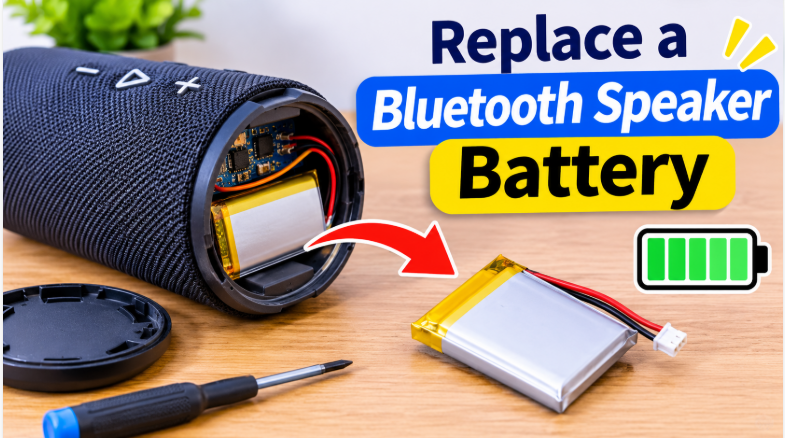
Quick answer: Can you replace a Bluetooth speaker battery? Yes, on many models — but not on all of them, and whether it’s worth it depends on the speaker’s design, age, and price. If your speaker has a screwed back panel and you can find the exact battery for its model, replacement is a cheap fix. If it’s glued shut, has a swollen battery, or costs less than the repair part, a new speaker is usually the smarter choice. Check the signs and the steps below before you open anything.
Every rechargeable battery wears out. After a few hundred charge cycles — usually two to three years of regular use — a Bluetooth speaker that once played all day may barely last an hour. That feels like the speaker is dead, but often only the battery is tired. The question is whether yours can be swapped, and whether the swap is worth the effort.
Can You Replace a Bluetooth Speaker Battery?
The short answer is: it depends on how your speaker was built. Some speakers are made to be opened — a back panel held by screws, a battery that unplugs with a small connector, and spare batteries sold for that exact model. Others are glued shut at the factory, with the battery soldered in place and no spare part available. The first kind is a half-hour job; the second kind is a fight you will probably lose, and you may break the speaker trying.
Before you touch a screwdriver, search your speaker’s exact model name plus “replacement battery”. If a matching battery shows up from the brand or a reputable parts seller, you’re in business. If nothing shows up, that itself is your answer — stop there and read the “not worth it” section below. Our battery life guide explains why capacity drops over time, so you can judge whether your speaker is aging normally or has a real fault.
Signs Your Battery Needs Replacing
Don’t replace a battery on a guess — first make sure the battery is actually the problem. These are the signs that point to it:
- Playtime has collapsed. A speaker that once lasted 10 hours now dies after one or two, even on a full charge.
- It dies suddenly. The speaker jumps from 40% to dead in minutes, or shuts off at half charge.
- It only works plugged in. Unplug it and it dies at once — the battery holds no charge at all.
- Charging takes forever — or never finishes. The charging light never turns green, or a full charge takes far longer than it used to. Our charge-time guide shows what normal charging looks like, so you can compare.
- The case is bulging. The back panel is lifting, the speaker rocks on a flat table, or a seam has opened. This is a swollen battery — stop using the speaker at once, don’t charge it, don’t puncture or squeeze it, and take it to an e-waste recycler. A swollen battery is a safety risk, not a DIY project.
One more check before you blame the battery: rule out the charger and cable first. A weak charger or a damaged cable can look exactly like a dying battery. Our not-charging guide walks through that diagnosis step by step — five minutes there can save you from replacing a battery that was never the problem.
Which Speakers Let You Replace the Battery
Easy to replace: medium and large speakers with a screwed back panel, a battery that connects with a plug (not soldered wires), and a spare battery available for the exact model. Many popular mid-range and premium speakers fall in this group.
Hard or impossible: tiny pocket speakers and cheap no-name models that are glued shut, speakers whose battery is soldered to the board, and models with no spare part on sale anywhere. Waterproof speakers deserve a special warning: opening one usually breaks its waterproof seal, so even a successful swap can leave you with a speaker that no longer survives a splash.
The warranty rule: if your speaker is still under warranty, claim the warranty instead of opening it. Opening the case almost always voids the warranty — and a warranty claim gets you a repair or replacement for free.
How to Replace a Bluetooth Speaker Battery Safely
If your model qualifies — screwed back, matching battery available, warranty expired — here is the safe way to do it:
- Buy the exact battery. Match the model number, voltage, and capacity. A battery that “looks the same” but has the wrong voltage can damage the speaker or overheat.
- Get the right tools. Small screwdrivers and a plastic pry tool. Never use a metal knife to lever a case open — one slip can puncture the battery.
- Power off and unplug. Work on a clean table, and take a photo of the wiring before you disconnect anything, so you can put it back exactly.
- Unplug, don’t yank. If the battery has a connector, unplug it gently. If the wires are soldered, stop — that job belongs to a repair shop, not a first attempt.
- Fit the new battery and test before closing. Power the speaker on, play a song, and check it charges — before you screw the back panel on again.
- Recycle the old battery. Never throw a lithium battery in household trash. Drop it at an e-waste or battery recycling point.
If any step feels wrong — the case won’t open, the battery is swollen, the wires are soldered — stop and take it to a repair shop. A shop charges for labour, but it is far cheaper than a ruined speaker or a damaged battery.
When Replacing the Battery Isn’t Worth It
Replacement is not always the smart move. Skip it when the speaker cost less than the battery plus tools. Skip it too when no exact battery is available, or when the speaker is glued shut or waterproof — opening kills the waterproof seal. And skip it when the speaker has other problems too, like a blown driver or a broken button, because a new battery won’t fix those. In all these cases, your money is better spent on a new speaker. Our buying guide runs through the 7 checks that matter before you pay, and our roundup of the best outdoor party speakers is a good place to start if you want ready picks.
The bottom line is simple: replace the battery when the part exists, the speaker opens cleanly, and the speaker is still worth keeping. Otherwise, let it go and buy better — and this time, pick a model with a screwed back and available spares, so the next battery swap is easy.
FAQs: Can You Replace a Bluetooth Speaker Battery?
Can you replace a Bluetooth speaker battery?
Yes, on many models — mainly speakers with a screwed back panel and a spare battery sold for that exact model. Glued-shut speakers and models with soldered batteries usually can’t be replaced at home.
How much does a Bluetooth speaker battery replacement cost?
The part itself is usually cheap — roughly the price of a small accessory — plus tools if you don’t have them. A repair shop adds labour on top. If the total comes close to the price of a new speaker, buying new is smarter.
Is a swollen Bluetooth speaker battery dangerous?
Yes. Stop using the speaker, don’t charge it, don’t puncture or squeeze it, and take it to an e-waste recycler. A swollen battery can overheat, and it should never be handled like a normal dead battery.
Will opening my speaker void the warranty?
In almost all cases, yes. If the speaker is still under warranty, claim the warranty first — a free repair or replacement beats a DIY swap every time.
Where do I buy the right replacement battery?
Search your speaker’s exact model name plus “replacement battery”, and buy from the brand or a reputable parts seller. Match the model number, voltage, and capacity exactly — a lookalike battery with the wrong voltage can damage the speaker.
Can a repair shop replace my Bluetooth speaker battery?
Yes, and for soldered, glued, or waterproof models it’s the best option. A shop has the tools and experience to open sealed speakers safely — ask for a price first, and compare it with the cost of a new speaker.