
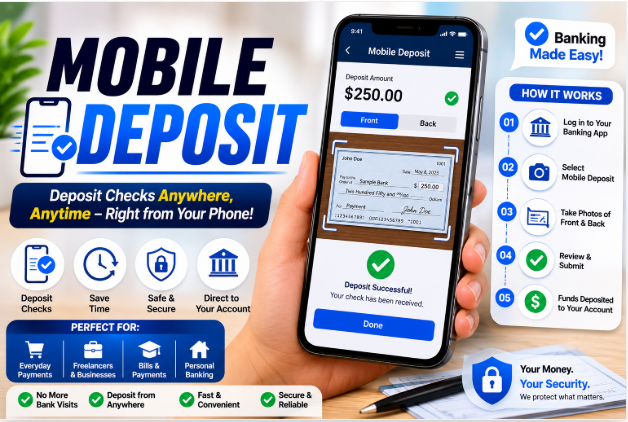
Tasks that once required a visit to a local branch can now be completed from the comfort of your home. One of the most convenient innovations in digital banking is mobile deposit, a feature that allows customers to deposit checks using a smartphone or tablet.
Whether you’re depositing a paycheck, a personal check, or a business payment, mobile deposit can save time and eliminate unnecessary trips to the bank. Millions of people now use this technology because it offers speed, convenience, and flexibility.
What Is Mobile Deposit?
- Open their banking app.
- Enter the deposit amount.
- Submit the check electronically.
The bank then reviews the images and processes the Mobile deposit.
Also Read Flash Mobile
How Mobile Deposit Works
Step 1: Open the Banking App
Log into your bank’s official mobile application.
Navigate to the mobile deposit section.
Step 2: Capture Images
Take clear photos of both sides of the check.
Ensure:
- Good lighting
- Clear focus
- Visible corners
- No shadows
Step 3: Enter Deposit Information
Input the check amount and select the account where the funds should be deposited.
Step 4: Submit the Deposit
Review the information and submit the mobile deposit request.
You’ll typically receive confirmation once the deposit has been accepted.
Benefits of Mobile Deposit
Mobile deposit offers numerous advantages for consumers and businesses.
Convenience
Perhaps the biggest benefit is convenience.
You can deposit a check from:
- Home
- Office
- Hotel
- Vacation destination
- Anywhere with internet access
There’s no need to wait in line at a bank branch.
Time Savings
Mobile deposit significantly reduces travel time and waiting periods.
Faster Banking Access
Many banks process deposits quickly, allowing customers to access funds sooner.
Improved Financial Management
Because deposits can be made immediately after receiving a check, users often manage cash flow more effectively.
Who Can Use Mobile Deposit?
Common users include:
Personal Banking Customers
Individuals frequently use mobile deposit for:
- Paychecks
- Gift checks
- Refund checks
- Personal payments
Small Business Owners
Business owners often deposit customer payments without visiting a branch.
Freelancers and Contractors
Independent professionals can quickly deposit client checks through their mobile devices.
Types of Checks Accepted
Most financial institutions accept various check types.
These often include:
- Payroll checks
- Personal checks
- Cashier’s checks
- Government checks
- Business checks
However, certain items may not qualify.
Examples may include:
- Foreign checks
- Third-party checks
- Damaged checks
- Money orders (depending on the bank)
Always review your bank’s policies before depositing.
Common Mobile Deposit Limits
Banks typically place limits on mobile deposits.
These limits may vary based on:
- Account history
- Banking relationship
- Deposit frequency
- Account type
Examples include:
- Daily deposit limits
- Monthly deposit limits
- Individual check limits
For instance, one customer may be allowed to deposit $5,000 per day, while another may have a higher limit based on account status.
How Long Does Mobile Deposit Take?
Processing times vary by institution.
In many cases:
- Deposits submitted during business hours may begin processing the same day.
- Some funds may become available immediately.
- Larger deposits may require additional review.
Factors affecting availability include mobile deposit:
- Deposit amount
- Account standing
- Bank policies
- Federal regulations
Customers should review their bank’s funds availability policy for specific timelines.
Mobile Deposit Security
Many people wonder whether mobile deposit is secure.
Modern banking apps use advanced security measures to protect customer information.
These measures often include:
Encryption
Data is encrypted during transmission to help prevent unauthorized access.
Multi-Factor Authentication
Many banks require additional verification steps before allowing account access.
Fraud Detection Systems
Banks monitor transactions for suspicious activity.
Secure Login Features
Fingerprint and facial recognition technology add extra protection.
These security measures help make mobile deposit a safe banking option.
Tips for Successful Mobile Deposit
Use Good Lighting
Poor lighting can result in rejected images.
Natural light or bright indoor lighting usually works best.
Place the Check on a Dark Surface
A contrasting background helps the mobile deposit camera capture clear images.
Keep the Check Flat
Wrinkled or folded checks may be difficult for the system to read.
Verify Information
Double-check the amount entered before submitting.
Save the mobile deposit Check
Keep the original check for a short period after the mobile deposit is accepted.
Many banks recommend retaining it for several weeks before destroying it.
Common Reasons Mobile Deposits Are Rejected
Occasionally, a mobile deposit may be declined.
Common reasons include:
Blurry Images
Unclear photos can prevent accurate processing.
Missing Endorsement
Failing to sign the back of the check is a common issue.
Incorrect Amount
Entering an amount that doesn’t match the mobile deposit check can trigger rejection.
Duplicate Mobile Deposit
Submitting the same check more than once is typically not allowed.
Damaged Checks
Torn, stained, or heavily worn checks may be difficult to process.
Mobile Deposit vs. ATM Deposit
Both options allow customers to mobile deposit checks without visiting a teller.
Mobile Deposit Advantages
- Greater convenience
- Available from almost anywhere
- No travel required
ATM Deposit Advantages
- May accept larger mobile deposit
- Suitable for cash deposits
- Immediate physical receipt
The best option depends on individual banking needs.
Future of Mobile Deposit
Digital banking continues evolving rapidly.
Future improvements may include:
- Faster processing times
- Enhanced fraud prevention
- Artificial intelligence verification
- Improved image recognition
- Real-time fund availability
As technology advances, mobile deposit is expected to become even more efficient and user-friendly.
Conclusion
Mobile deposit has transformed the way people manage their finances by allowing checks to be deposited quickly and conveniently through a smartphone. Whether you’re a busy professional, small business owner, or everyday banking customer, this feature offers significant advantages in terms of time savings, accessibility, and flexibility.
By understanding how mobile deposit works and following best practices, users can enjoy a secure and efficient banking experience. As digital banking technology continues to improve, deposit will likely remain one of the most valuable tools available to modern consumers.
Faqs
What is mobile deposit?
Mobile deposit is a banking feature that allows customers to deposit checks electronically using a smartphone and a banking app.
Is mobile deposit safe?
Yes. Most banks use encryption, authentication tools, and fraud detection systems to secure mobile deposits.
How long does a mobile deposit take?
Processing times vary, but many mobile deposit begin processing the same day they are submitted.
Can I deposit any check using mobile deposit?
Most personal, payroll, government, and business checks are accepted, although restrictions may apply.
Do I need to keep the check after depositing it?
Yes. Most banks recommend keeping the mobile deposit original check for a short period before securely destroying it.
Why was my mobile deposit rejected?
Common reasons include blurry images, missing endorsements, incorrect information, or duplicate submissions.